Product Overview

One Platform for Safer, More Efficient Flight

Beacon brings Murdock and Lighthouse together into a single integrated system that augments the pilot through the full flight lifecycle, from schedule to debrief and trip closeout.

AIRCRAFT

Murdock

AI pilot assistant

Pilot in the decision loop

Flight data

Product updates

CLOUD

Lighthouse

Flight intelligence platform

Aircraft to cloud, and back

Murdock

In the cockpit

Murdock

The onboard AI assistant for the crew. Runs at the edge, designed for austere and denied environments, and adaptable across many aircraft.

Edge compute, on-aircraft

Hardware-lite integration

Built for austere & denied environments

Lighthouse

In the cloud

Lighthouse

Beacon’s flight intelligence platform. It turns each flight’s data into insight that crews, operations, and safety teams can use before, during, and after the flight.

Flight debrief & playback

Fleet monitoring & readiness

In-flight support where connected

Aircraft to cloud, and back

Murdock

In the cockpit

Murdock

The onboard AI assistant for the crew. Runs at the edge, designed for austere and denied environments, and adaptable across many aircraft.

Edge compute, on-aircraft

Hardware-lite integration

Built for austere & denied environments
Lighthouse

In the cloud

Lighthouse

Beacon’s flight intelligence platform. It turns each flight’s data into insight that crews, operations, and safety teams can use before, during, and after the flight.

Flight debrief & playback

Fleet monitoring & readiness

In-flight support where connected

Aircraft to cloud, and back

Murdock

In the cockpit

Murdock

The onboard AI assistant for the crew. Runs at the edge, designed for austere and denied environments, and adaptable across many aircraft.

Edge compute, on-aircraft

Hardware-lite integration

Built for austere & denied environments
Lighthouse

In the cloud

Lighthouse

Beacon’s flight intelligence platform. It turns each flight’s data into insight that crews, operations, and safety teams can use before, during, and after the flight.

Flight debrief & playback

Fleet monitoring & readiness

In-flight support where connected

Aircraft Integration

Aircraft Integration

How Beacon Fits
on the Aircraft

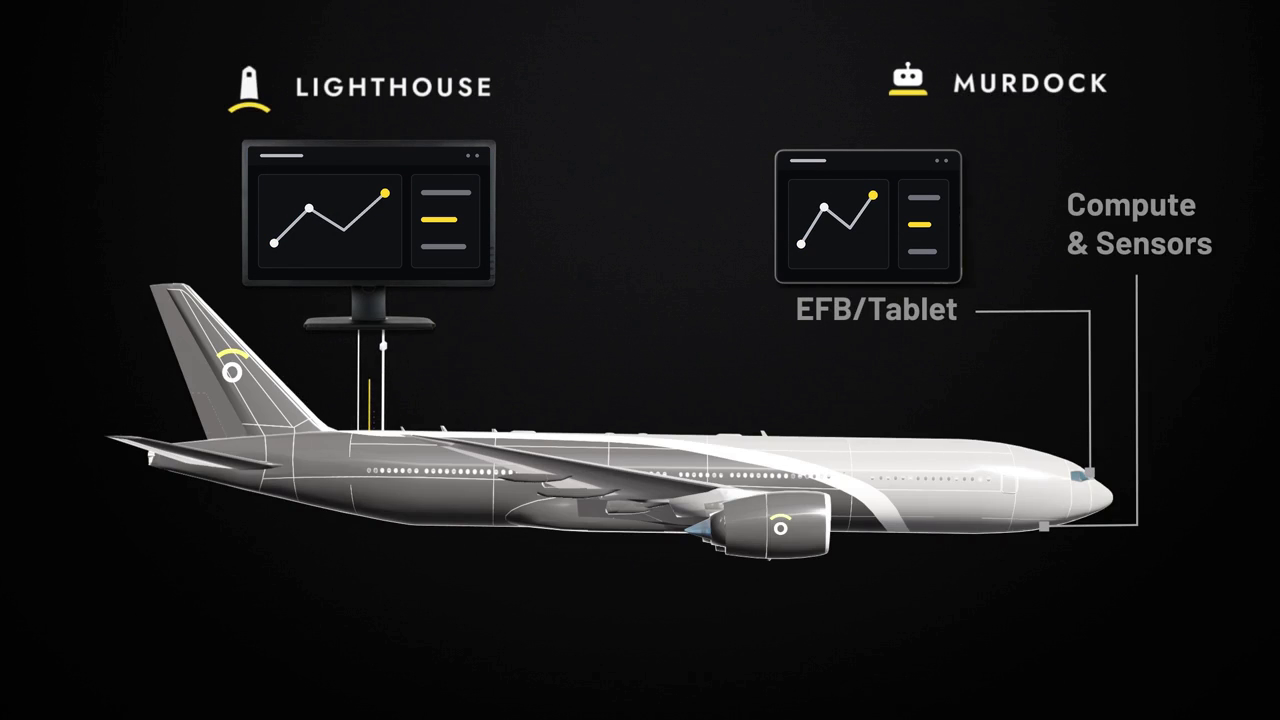
Murdock is a modular compute and crew-interface system that reads from certified avionics buses, advises the crew, and records flight data for debrief, without modifying the aircraft’s certified flight-critical systems. It can connect to Lighthouse, Beacon’s flight intelligence platform, over satellite communication.

01

Onboard compute and sensors

Reads data the aircraft already produces. Aboard the KC-46A, it connected through an interface the Air Force already fields.

02

Murdock’s tablet interface

Advises the crew; the pilot decides.

03

Lighthouse connection

Connects to Lighthouse over satellite communication where available.

A high-level diagram shows an aircraft linked to onboard compute and sensors, Murdock’s tablet interface, and Lighthouse.

Flight Record

Flight Record

Flown on Real Aircraft, With the Pilot in Command

Beacon’s pilot assistance has flown in a flight-test campaign using Beacon’s aircraft and in an in-flight evaluation aboard operational U.S. Air Force KC-46A tankers. Each flight adds to the evidence crews and program offices need to trust it.

Three Roles Across Three Systems

Every part of the platform plays the same three roles for the crew.

Safety Net

Helps crews recognize risks and avoid unsafe actions.

Coach

Offers guidance to help crews improve performance.

Superhuman

Processes multiple information streams in parallel to support crew decisions.

Role

System

Safety Net

Coach

Superhuman

APAS

Advanced Pilot Assistance System

Catches errors before they become incidents

Reinforces best-practice technique

Can handle simultaneous tasks

PRS

Pilot Routing System

Keeps the aircraft clear of known hazards

Improves route and profile efficiency

Weighs options faster than a crew can by hand

ARES

Aircrew Readiness and Endurance System

Surfaces crew readiness risk

Guides recovery and remediation

Supports the whole crew continuously

Three Roles Across Three Systems

Every part of the platform plays the same three roles for the crew.

Safety Net

Helps crews recognize risks and avoid unsafe actions.

Coach

Offers guidance to help crews improve performance.

Superhuman

Processes multiple information streams in parallel to support crew decisions.

APAS

Advanced Pilot Assistance System

Safety Net

Catches errors before they become incidents

Coach

Reinforces best-practice technique

Superhuman

Can handle simultaneous tasks

PRS

Pilot Routing System

Safety Net

Keeps the aircraft clear of known hazards

Coach

Improves route and profile efficiency

Superhuman

Weighs options faster than a crew can by hand

ARES

Aircrew Readiness and Endurance System

Safety Net

Surfaces crew readiness risk

Coach

Guides recovery and remediation

Superhuman

Supports the whole crew continuously

APAS / Advanced Pilot Assistance System

APAS / Advanced Pilot Assistance System

Driver Assistance, Built for Pilots

Think of advanced driver-assistance systems (ADAS) in a car, adapted to the flight deck. APAS is designed to support configuration checks, checklists, and procedures, and help crews recognize developing risks. It provides advisory assistance while the pilot stays in control.

01

Cross-check aircraft configuration

02

Work through checklists

03

Follow the relevant procedure

Beacon diagram of the July 7, 2017 night approach at San Francisco: the aircraft lined up with occupied Taxiway C instead of Runway 28R, then went around.

Historical case · SFO, 2017. On a night approach, an airliner lined up with Taxiway C, where four aircraft were waiting, instead of Runway 28R. The crew went around and no one was hurt. Skilled crews are human too, and this is the moment cockpit assistance is built for.

PRS / Pilot Routing System

PRS / Pilot Routing System

Compare the Options, Then Choose the Route

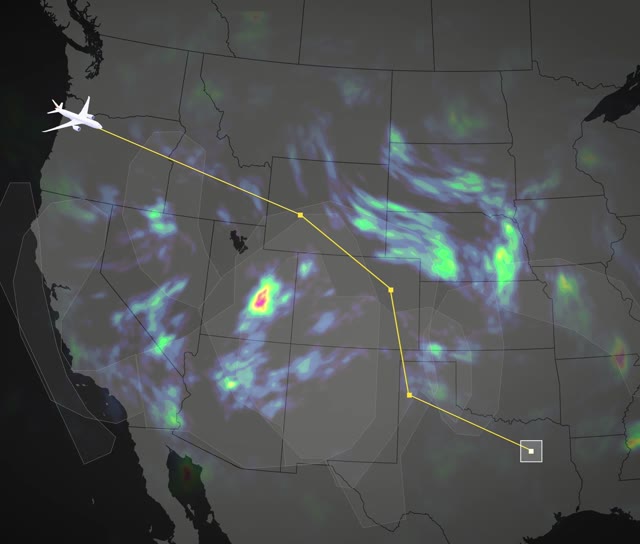
Bring weather, airspace, and route options into the same decision. PRS helps the crew compare the options before they choose a route. On airline margins of a few percent, the fuel and time a better route saves add up.

01

Assess conditions

02

Compare route options

03

Highlight a recommendation

Concept illustration showing weather and airspace conditions, alternative flight routes, and a highlighted route recommendation for pilot review.

Routing assistance, with the pilot in the decision loop.

ARES / Aircrew Readiness and Endurance System

ARES / Aircrew Readiness and Endurance System

Keep Crew Readiness in View

Built first for defense aircrews, ARES brings crew readiness into view, so crews and commanders can recognize emerging risks and adjust before and during the mission.

01

Readiness before the mission

02

Workload during the flight

03

Recovery after landing

An animated cockpit view at night outlines the two pilots.

Fleet Learning

Fleet Learning

From Real Flights to Better Updates

Each operator’s aircraft and Murdock data shape that operator’s Lighthouse insights and the features the operator asks for next. Beacon engineers and tests each one before it goes back to the aircraft.

  1. 01On the aircraft

    Collect Flight Data

    Aircraft and Murdock data from each of the operator’s flights.

  2. 02In Lighthouse

    Review and Prioritize

    Insight for the operator’s crews and teams, and the features they want next.

  3. 03At Beacon

    Engineer and Test

    Each feature is engineered and tested before it reaches the aircraft.

  4. 04Back on the aircraft

    Deploy the Update

    Tested capabilities go out, and the next flights inform the next cycle.

Assurance

Built to Earn a Crew’s Trust

Pilot in Command

Beacon advises, the pilot decides, and the pilot can override it at any time.

No Flight-Control Changes

No new servos and no changes to the aircraft’s certified flight-critical systems or flight controls.

Tested Before It Flies

Updates go out only after Beacon has engineered and tested them.

Advisory by Design

At Level 2, Murdock advises the crew and the crew decides, as it did aboard operational KC-46As.

For Safety Teams

Connect what flight data shows with crew guidance and in-flight assistance.

For Operators

Bring weather, fuel, and issue-reporting context into planning and follow-up.

For Crews

Advisory support for procedures, routing, and readiness as the flight unfolds.

Let’s Talk About Your Operation

For flight operations, safety, training, and program leaders. Tell us where your crews need support.

San Carlos, California